
Ask Claude for the video.
Watch it build on a real timeline.
CNEX Cut is a free desktop video editor, and your own Claude can drive it — Claude Code, Claude Desktop, or anything else that speaks the same protocol. Not a prompt box that returns a file: the actual timeline, changing in front of you, every edit one ⌘Z away.
Uses the Claude subscription you already pay for. CNEX Cut charges nothing for it.
Account → Claude → Connect.
The app looks for what is installed on your machine and wires it up itself. If a client isn't there, the card offers to go and get it rather than showing a button that cannot work.
- 01It finds what you haveOpen Account → Claude. The app looks for Claude Code and Claude Desktop on this machine and lists what it found.
- 02One button per clientConnect writes the entry itself — the command for Claude Code, a merged entry in the config file for Claude Desktop. There is nothing to fill in.
- 03Restart it — the step everyone skipsThe app says so plainly: quit the client and open it again. Then ask it for a video.
Claude Code last talked to CNEX-Cut 2 minutes ago.
That line is what the app shows once an assistant has actually checked in — not when a file was written. “Connected” on its own is not a fact.
Or do it by hand — and check it the same way:
claude mcp add --scope user cnex-cut -e ELECTRON_RUN_AS_NODE=1 -- \
  "/Applications/CNEX-Cut.app/Contents/MacOS/CNEX-Cut" \
"/Applications/CNEX-Cut.app/Contents/Resources/app.asar.unpacked/bin/cnex-cut-mcp.mjs"$ claude mcp list cnex-cut: /Applications/CNEX-Cut.app/… /bin/cnex-cut-mcp.mjs - ✔ Connected
That is this machine, a minute ago. The entry points at the app itself rather than at node, because a video editor's audience has no reason to have Node installed — and the failure would surface later, somewhere else.
Say it once.
Watch what it actually did.
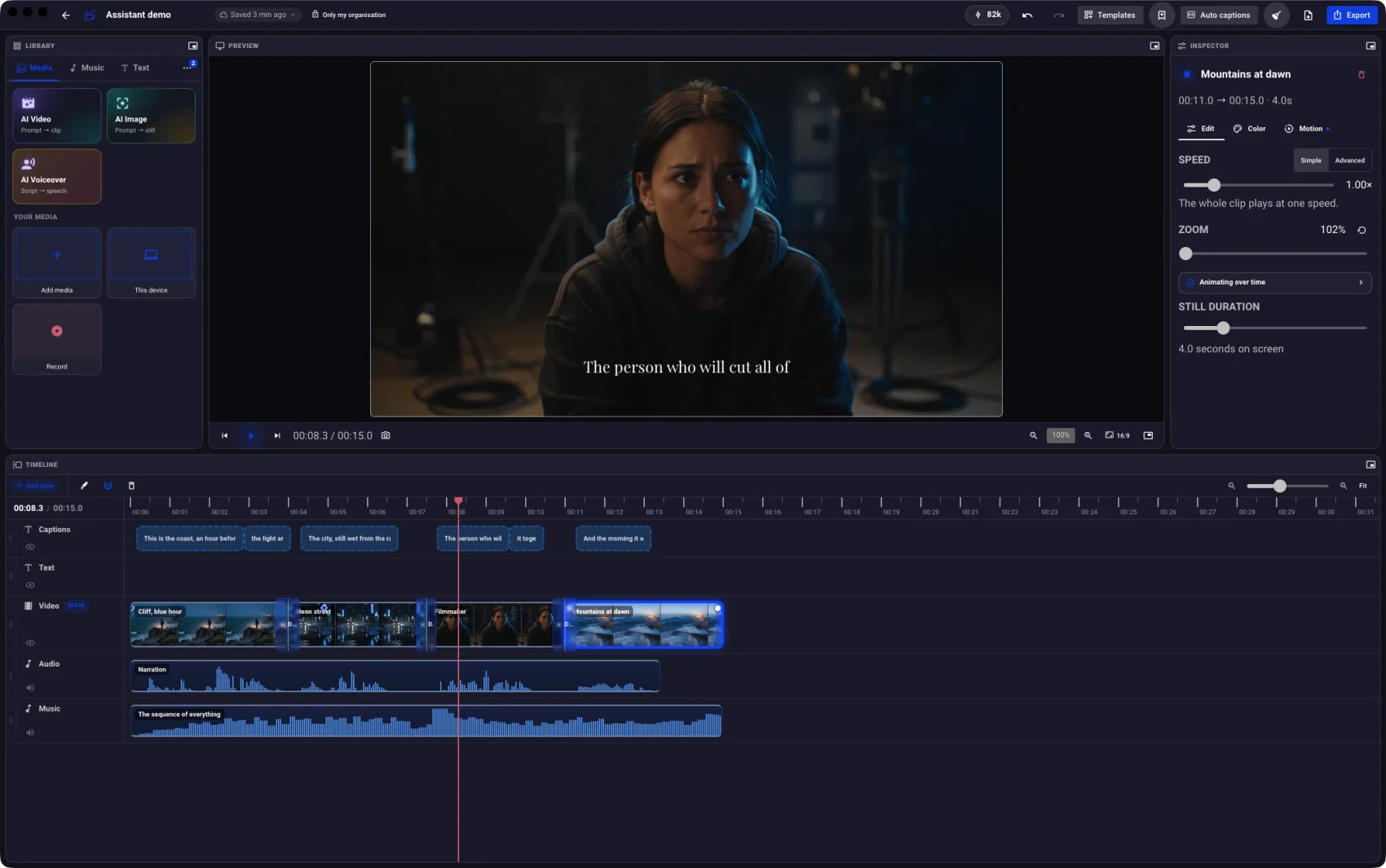
Every frame below is a photograph of the app at that moment of this exact sequence, captured while an assistant drove it. The names under each step are the operations it called to get to the next picture.
You


- Looked at the project and the footageA new 16:9 project at 30 fps, and the shots already in the workspace
- Laid four shots down, in orderFour clips, fifteen seconds, each trimmed to length as it landed
- Spoke the narration in a chosen voiceOne voice, four lines, each timed to land inside its own shot
- Captioned it, scored it, and softened the cutsSix caption lines off the narration, a bed underneath, dissolves between the shots
Other things people ask for
- “Find the bit where she mentions the price and cut everything before it”It reads the spoken words, finds the moment, and trims the front off.
- “Take out every silence longer than a second”It finds the dead air, lifts it, and closes the gaps behind it.
- “Make a 9:16 version that keeps the faces in frame”It re-frames every shot for the new shape, then looks at the result to check.
- “Put the cuts on the beat of that track”It reads the tempo and moves each shot change onto a beat.
- “Caption it, then put the captions in Spanish too”Captions off the audio, styled, then the same lines translated.
- “Record my screen for two minutes and put it on the timeline”It records the window you name and drops the take straight on the timeline.
It doesn't guess what your video looks like.
It sees
It can composite the real preview and look at the actual frame, so a title’s position or a colour grade is something it checks rather than assumes. It can take a whole stretch back as one contact sheet with the timecodes on it, which is how a pacing problem becomes visible rather than theoretical.
It reads
It can read the spoken words with their timings, straight off the captions on the timeline. Finding a moment by what is said in it stops being a matter of scrubbing back and forth looking for it.
It hears
It can read the tempo and the beat and bar positions as times on your timeline, and move the shots so that every change lands on one of them.
- 0:00.2This is the coast, an hour before
- 0:02.9the light arrives.
- 0:04.3The city, still wet from the rain.
- 0:07.8The person who will cut all of
- 0:09.6it together.
- 0:11.3And the morning it was made for.
That is how “the bit where she mentions the price” gets found without anybody watching anything.
One instruction is one ⌘Z.
“Add a title” is really an insert plus three property writes. The app records how deep the history was before your instruction and folds back to exactly there — so undo removes what you asked for, not the last internal step of it.
Every change lands on the same undo stack as a mouse drag, because it is the same composition — not a copy, and not a queue of intents waiting to be applied.
- It appears live. You are watching it happen, not waiting for a job to finish.
- It fires the same autosave your own edits do.
- It can look at the result and fix its own work before handing it back.
- If you hate it, one keystroke and it never happened.
Your Claude. Your machine.
Your footage.
Your Claude subscription does the thinking, and there is no per-token anything on our side. The only operations that spend CNEX credits are the ones that spend somebody else's GPUs — generated clips and voices — and the app quotes those before it spends them.
It talks over loopback
The app listens locally. None of this is on the internet, and no footage is uploaded to make it work.
A bearer token
Generated once and kept at ~/.cnex-cut/mcp.json, file mode 600. A client’s configuration keeps working across restarts; nothing else on the machine gets in.
Web pages are refused
Any request carrying a non-local origin is rejected outright, which closes the path a page in your browser would otherwise use to reach a local port.
Where it may write
An assistant can name a destination — that is what makes “put it in my repo” work — but not any destination. Inside your home directory, never a dot-directory, media files only. The app’s main process decides; the editor never does.
“Render it and put it in my repo.”
Exports run on your own machine when the project allows — free, uncapped, and it says so — and when they can't, the app names the reason instead of quietly spending credits. Give it a destination and the finished file is written there.
The session that has your website checked out can build the video and drop it into public/. One conversation instead of two.
YouRender that at 1080p and put it in ~/site/public/video.
CNEX CutRendered on this device — free, no credits spent. Written to ~/site/public/video/teaser.mp4 (14.2 MB).
YouNow make a 9:16 version for the socials.
Ask with the app shut, and nothing breaks.
The bridge answers on its own from the catalogue the app wrote down last time, so Claude still knows exactly what it could do and replies “open CNEX Cut and I'll build that” — rather than your client reporting a broken server and you going to look at config files.
Not “anything”.
Anything you could do with the mouse.
Roughly eighty distinct operations, and every one of them is a thing you could have done yourself with a pointer. It cannot invent footage you do not have — it can generate some, for credits — and it cannot publish anything without being asked to.
The cut
Trim, split, reorder, duplicate, close gaps, lift a range out by time — or by what is said in it.
The look
Grades and presets, tone curves, effects, vignettes and grain, transitions, fades in and out.
Motion
Keyframed moves, push-ins and drift, re-framing for another aspect, speed curves along a clip.
Sound
Levels, EQ, fades, music beds, beat-matching, splitting audio off a shot, cleaning up a voice.
Words
Titles and lower thirds, captions from the audio, styling them, translating them, exporting them.
Generation
Clips, stills and spoken voice — the parts that spend credits, and only when asked for.
Recording
Screen, a single window, camera, or the sound the machine itself is playing, straight onto the timeline.
Delivery
Render on your machine or in the cloud, write the file where you want it, or publish it onward.
Questions a Claude user actually asks
- Do I need Node.js installed?
- No. The entry points at the app itself, which ships its own runtime. Configuring it as a plain node script is the obvious thing to do and it is wrong — a video editor’s audience has no reason to have Node, and the failure would surface later and somewhere else.
- Does this use my Claude usage?
- Yes — it is your subscription doing the work. That is the point: nobody pays twice, and there is no per-token charge from us.
- Does it work with something other than Claude?
- Anything that speaks the same protocol can connect. Claude Code and Claude Desktop are the two the app sets up with a button; anything else uses the command above.
- Do I have to pay CNEX anything?
- No. The editor is free, with no watermark and no trial clock, and this is part of it. Generated clips and voices spend credits; nothing else does.
- Where does my footage go?
- Nowhere. It is edited where it already sits on your disk, and the assistant talks to the app on your machine rather than to a server.
- Can I take it away again?
- Disconnect is the same button. It removes the entry from the client’s configuration — nothing is left behind.
Install it, connect it,
then paste this.
Open CNEX Cut, make me a 20-second vertical teaser from the clips in my Downloads folder, cut it on the beat, caption it, and save it to my Desktop.